
Discover Mobile
Discover Financial ServicesFinance
4.8108.86K Reviews
- Version
- 2616.0
- Installs
- 10.00M
- Age Rating
- Everyone
Screenshots

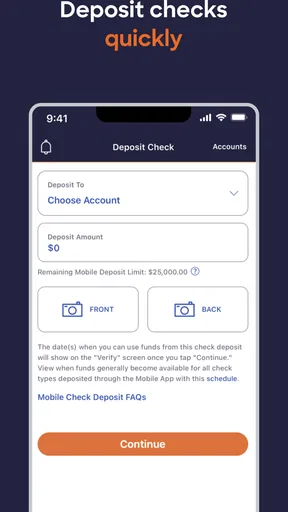

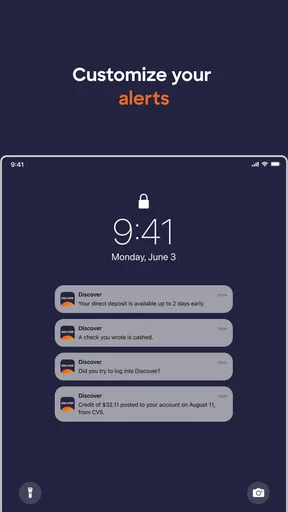
Our Review of Discover Mobile
 Analysis by Appyee
Managing a credit card from a phone sounds simple until you need to check a recent purchase, understand an available balance, or make a payment while you are away from a computer. I spent time using Discover Mobile with that practical mindset, focusing less on flashy presentation and more on whether it makes routine account management feel quick, clear, and dependable. It is a free finance app from Discover Financial Services, aimed at people who already use Discover and want their account close at hand.
My overall impression is favorable: the app is most useful when you want a direct route to everyday account tasks rather than a broad personal-finance dashboard. It feels purpose-built for staying connected to a Discover account, and that narrow focus is both its biggest strength and its main limitation. If your financial life is centered on Discover, the app can reduce friction. If you want one place to combine several banks, cards, investments, and budgeting tools, you may find it too focused.
How Discover Mobile feels during ordinary use
I find the app most useful when I arrive with one clear question, such as whether a purchase has appeared or whether I need to review my account before spending. That focused routine keeps a quick check from turning into an uncertain scroll through financial details. It also sets up the next question: how much confidence should I place in a finance app when I use it for those everyday decisions?
Speed expectations for quick account checks
The first thing I look for in a finance app is whether it gets out of the way. I do not want to navigate through decorative screens just to answer a basic question such as whether a payment has posted or whether a purchase is visible. Discover Mobile generally makes sense as a quick-check tool: open it, authenticate, review the account, and leave. That straightforward purpose gives it a more focused feel than many general money-management apps.
The app has been available since February 2, 2010, and its current version is 2616.0. Those details do not guarantee that every phone will feel identical, but they do place the app in the category of an established mobile banking product rather than a new experiment. In my experience, that maturity matters because finance apps are judged by small moments: whether screens are understandable, whether an action is easy to locate, and whether the app leaves me confident that I checked the right information.
I would not choose it because I expect a dramatic, instant experience on every device. Financial applications often have to retrieve account information securely, and the perceived speed can depend on connectivity, authentication, and the service behind the screen. The useful expectation is more modest: it should be convenient for short sessions, not necessarily a replacement for every task I might perform on a full website.
That distinction is important. When I am standing in a store and want to verify a transaction, a compact mobile workflow is exactly what I need. When I am reconciling a long period of spending or trying to understand several accounts at once, a larger screen and more spacious layout are usually better. The app handles the first situation more naturally than the second.
What happens during heavier use
A finance app becomes more demanding when I stop using it for one question and start moving through several account details in one sitting. For example, I might review recent activity, inspect a payment, check the balance, and then return to confirm that I have not missed another transaction. This kind of session is where navigation design matters more than raw speed. I want to know where I am and how to return without starting over.
Discover Mobile is best approached as a sequence of focused tasks. I would open it with a particular goal rather than browse aimlessly. That habit makes the app feel lighter and also reduces the chance of misreading information while moving quickly. For a cardholder checking spending before making a purchase, that is a practical advantage: the app encourages a short decision-making loop instead of turning account management into a prolonged visit.
A realistic example is a weekend trip. Before paying for a hotel or rental, I can use the app to check the account and recent activity. Later, if a charge appears that I do not immediately recognize, I can review it while the details are fresh. The value is not that the phone replaces careful financial review; it is that the relevant account is available at the moment a question arises.
There is also a trade-off in keeping the experience centered on Discover. I do not have to mentally filter a crowded collection of unrelated financial products, but I also should not expect the kind of cross-account comparison offered by dedicated budgeting services. Heavy use is comfortable when the work concerns Discover. It becomes less efficient when the work is broader than that.
Reliability matters more than visual polish
For this type of app, reliability is not simply whether it opens. I consider an app reliable when I can trust the information I am viewing, understand the state of an action, and return later without confusion. Discover Mobile benefits from being connected to a specific financial provider, because the experience is not trying to act as a universal layer over many unrelated institutions.
That focus also shapes how I would use it during an important moment. I would check the app before making a large purchase, but I would still read the transaction details carefully rather than relying on a glance at a single balance figure. A mobile screen can make information feel simpler than it really is. The app is a useful access point, not permission to stop reviewing statements or questioning unfamiliar activity.
One of the more useful habits is to treat the app as a confirmation tool. After making a payment or checking a purchase, I would return later to verify the account reflects the expected change. This is more dependable than assuming that tapping a button automatically means the financial task is complete. The app can make the process convenient, but my own follow-up remains part of responsible account management.
I also appreciate that the product has a broad audience. Its content rating is Everyone, so it is positioned as an ordinary account-management app rather than an age-restricted entertainment product. That does not remove the need for careful phone security, but it does make the intended use clear: everyday financial access for Discover customers.
Device constraints and practical expectations
The stated minimum operating system is version 11, which is a meaningful consideration before installing it. Anyone using an older device should check compatibility first rather than assuming that a finance app will run on any phone. For people with a supported device, the more important constraints are likely to be the phone’s general condition, available storage, connection quality, and the way authentication works on that particular handset.
I would also avoid judging the app only by how quickly it launches on a powerful recent phone. A newer device may make the interface feel immediate, while an older supported phone can make transitions feel less fluid. That is not unique to Discover Mobile, but it matters here because people often open financial apps in a hurry. If your phone already struggles with ordinary applications, this is not the place where I would expect miracles.
Resource demands are difficult to judge from the app’s purpose alone, and I would not install it expecting it to function as a complete financial archive stored locally on the device. A sensible approach is to keep the phone’s operating system current within its supported range, close the app when finished, and avoid using an unreliable connection for a time-sensitive account action. Those are simple steps, but they reduce avoidable frustration.
There is another device-related issue that is easy to overlook: the phone itself becomes part of the access chain. A lost, shared, or poorly protected phone can make convenient account access feel less convenient very quickly. I would use a strong device lock, avoid leaving the account open in a public place, and be deliberate about signing out or securing the screen when someone else might handle the phone.
Small workflow choices that improve the experience
The best way to use Discover Mobile is to give each visit a clear purpose. Before opening it, I would decide whether I am checking activity, reviewing the account, or handling a payment-related task. That sounds obvious, but it prevents the common mistake of scanning quickly and leaving without confirming the detail that actually mattered.
For unfamiliar transactions, I would compare the merchant name and timing with my own memory before assuming the charge is fraudulent. Merchant descriptions can look different from the name used at the checkout counter, so a calm review is better than an immediate conclusion. The app is valuable here because it puts recent account information within reach, but the interpretation still requires attention.
For recurring spending, I would use the app as a prompt for a larger monthly review rather than trying to perform the entire review on a small screen. Quick checks are where it shines. A longer examination is easier when I can see more information at once, take notes, and compare records without repeatedly changing screens.
Another useful trade-off is separating monitoring from planning. Discover Mobile can help me see what is happening with the Discover account, but it is not automatically the same thing as a full household budget. If I need categories across several providers, savings targets, or a combined view of cash and credit, a dedicated budgeting app or the individual websites of those providers may be a better companion.
Who should use it, and who should look elsewhere?
I would recommend Discover Mobile first to an existing Discover customer who values convenient phone access and prefers dealing directly with the card provider. It is a particularly sensible fit for someone who checks activity often, travels with a phone, or wants a quick way to stay aware of account changes without opening a desktop browser.
The app is also a reasonable choice for people who dislike financial software packed with unrelated features. Its identity is clear: it is a finance app for managing a Discover account. That can make the learning curve gentler than a broad money platform where banking, investing, budgeting, and credit information are all mixed together.
I would be more cautious recommending it to someone who does not use Discover or who wants a single dashboard for multiple institutions. In that situation, the direct-provider approach becomes a limitation. A bank-aggregation or budgeting service may save more time, even if it is less specialized. Likewise, someone who prefers doing detailed financial administration on a computer may see the mobile app as a useful supplement rather than a primary workspace.
It is worth noting the scale of adoption without treating popularity as proof of perfection: the app has more than ten million installs, an average rating of 4.8, and roughly 491 thousand ratings. Those figures suggest that many people find it useful, but they do not tell me whether it matches an individual user’s needs. A high rating cannot turn a single-provider app into a multi-bank planner.
How it compares with usual finance alternatives
Compared with a desktop account website, Discover Mobile wins on immediacy. I can reach for the phone when a question appears instead of waiting until I am near a computer. The website is likely the more comfortable option for extended review, especially when I want to examine a lot of information or keep several windows open.
Compared with a general budgeting app, the advantage is focus. A budgeting platform may offer a wider financial picture, but it can also introduce synchronization steps, multiple account connections, and a more complicated interface. Discover Mobile avoids that broader mission. The cost is that I do not get the same all-in-one view of my financial life.
Compared with another card issuer’s mobile app, the deciding factor is usually the account relationship rather than a universal feature checklist. If my primary card is Discover, using the provider’s own app is more direct than forcing the account into a separate tool for every basic check. If my cards are spread across several issuers, a combined financial service may be more efficient for monitoring, while the official app remains useful for provider-specific access.
That is why I would not call Discover Mobile the best finance app for everyone. I would call it a sensible official companion for Discover customers who value direct access. The narrower purpose gives it clarity, but it also means I would pair it with another tool if my needs extend into broader financial planning.
My performance verdict
After using it as an everyday account companion, I see Discover Mobile as a practical, focused app rather than an ambitious financial command center. Its strongest performance is in short, purposeful sessions: checking activity, reviewing the account before a purchase, or staying connected while away from a computer. That is where convenience matters most, and the app’s single-provider design works in its favor.
Its limitations are equally clear. It is not the right answer for users seeking a unified view across many financial institutions, and a phone screen is not ideal for detailed reconciliation. Performance can also feel different from one supported device to another, so I would keep expectations realistic if the handset is older or the connection is inconsistent.
Discover Financial Services has built an established mobile option for its own customers, and the app is free to use. With an Everyone content rating and support beginning with operating system version 11, it is accessible to a broad group of compatible phone users. I would install it if I had a Discover account and wanted a dependable first stop for routine checks.
My recommendation is simple: use Discover Mobile for direct, frequent account awareness, but do not mistake it for a complete personal-finance system. It earns its place on my phone because it shortens common account tasks without trying to solve problems outside its lane. For a Discover customer who wants that balance of focus and convenience, it is an easy app to recommend; for someone managing several providers or doing deep financial planning, it works better as one part of a larger setup.
Verdict
Strengths of Discover Mobile
- Clean interface makes browsing local discoveries quick and intuitive.
- Useful location-based suggestions help uncover places nearby.
- Listings can inspire ideas for activities, food, and entertainment.
- Convenient mobile access is helpful when exploring an unfamiliar area.
- Discovery-focused design keeps the experience simple and engaging.
Limitations of Discover Mobile
- Recommendation quality may vary depending on your location.
- Some listings may contain outdated details or unavailable offers.
- The app can feel less useful in areas with limited coverage.
- Frequent location access may affect battery life and privacy comfort.
- You may need an account or extra permissions to use key features.
Similar Picks in This Category
View All
Google Wallet
Google LLC4.3

Airtel: Recharge, Bank & Loans
Airtel4.0

PayPal - Pay, Send, Save
PayPal Mobile4.2

DANA Indonesia Digital Wallet
PT Espay Debit Indonesia Koe4.5

Binance: Buy Bitcoin & Crypto
Binance Inc.4.8

Cash App
Block, Inc.4.7
Frequently Asked Questions
What is Discover Mobile, and what can I use it for?
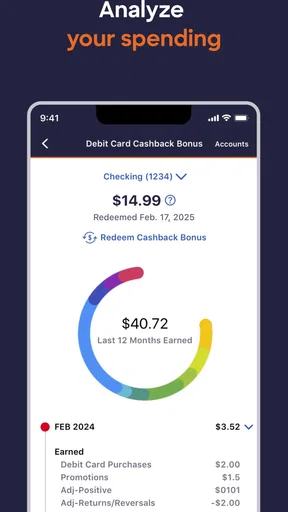
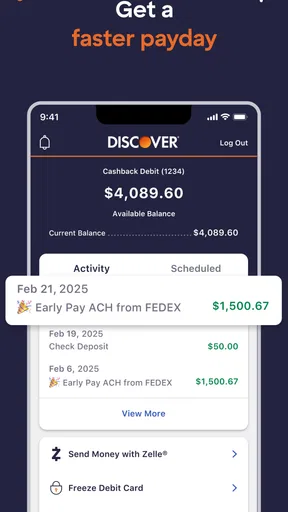
Discover Mobile is the official mobile banking application for Discover customers. After signing in, users can review account balances, check recent transactions, pay eligible bills, manage credit card payments, monitor rewards, and receive account notifications. The exact tools available may depend on the Discover product you own, your account status, and your location.
Is Discover Mobile safe to use for banking and payments?
Discover Mobile includes security features designed to protect account access and financial information, such as secure sign-in, account alerts, device verification, and fraud monitoring. Even so, users should download the app only from the official Google Play Store or Apple App Store, keep their device updated, avoid public Wi-Fi for sensitive actions, and never share passwords or verification codes.
Can I pay my Discover credit card bill through the app?
Yes, Discover Mobile generally allows eligible cardholders to make one-time payments, schedule future payments, manage payment accounts, and review payment history directly from the application. Before confirming a payment, check the selected bank account, payment amount, and processing date carefully. Availability and processing times can vary depending on account type, weekends, holidays, and bank policies.
Does Discover Mobile provide transaction alerts and credit information?
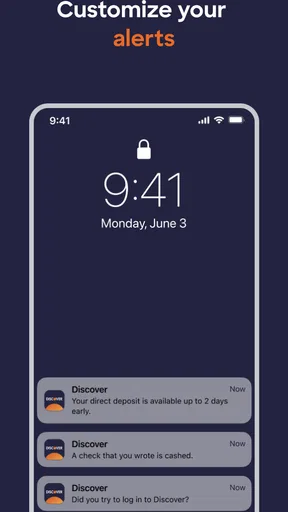
The app can provide useful account notifications, including purchase alerts, payment reminders, unusual activity warnings, and other account updates, depending on the settings enabled. Eligible users may also be able to view credit-related information, such as a FICO score or credit monitoring details. These features are informational and should not replace reviewing your full credit report.
What should I do if Discover Mobile will not open or I cannot sign in?
If the application fails to open or sign-in does not work, first check your internet connection and confirm that you are using the latest version of Discover Mobile. Restarting the device or reinstalling the app may also help, although you should know your login details before doing so. For locked accounts, forgotten credentials, or suspected fraud, use Discover’s official support options rather than unofficial websites or messages.
